When 1GB Isn't Enough — Learning Linux Swap
When 1GB Isn't Enough — Linux Swap
I spun up a cheap 1GB VPS and figured it'd be fine for light stuff. Then I tried installing Claude Code and got this mid-install:
Setting up Claude Code...
Installing Claude Code native build latest...
bash: line 158: 1684698 Killed "$binary_path" install ${TARGET:+"$TARGET"}
That Killed — no stack trace, no polite error — is bash reporting that the process was terminated by SIGKILL. Not a bug in the code. The kernel itself stepped in, decided something had to die, and picked this. That's the OOM killer. I had burned through all available physical memory and the kernel had exactly zero other options.
So I learned about swap.
What Even Is Swap?
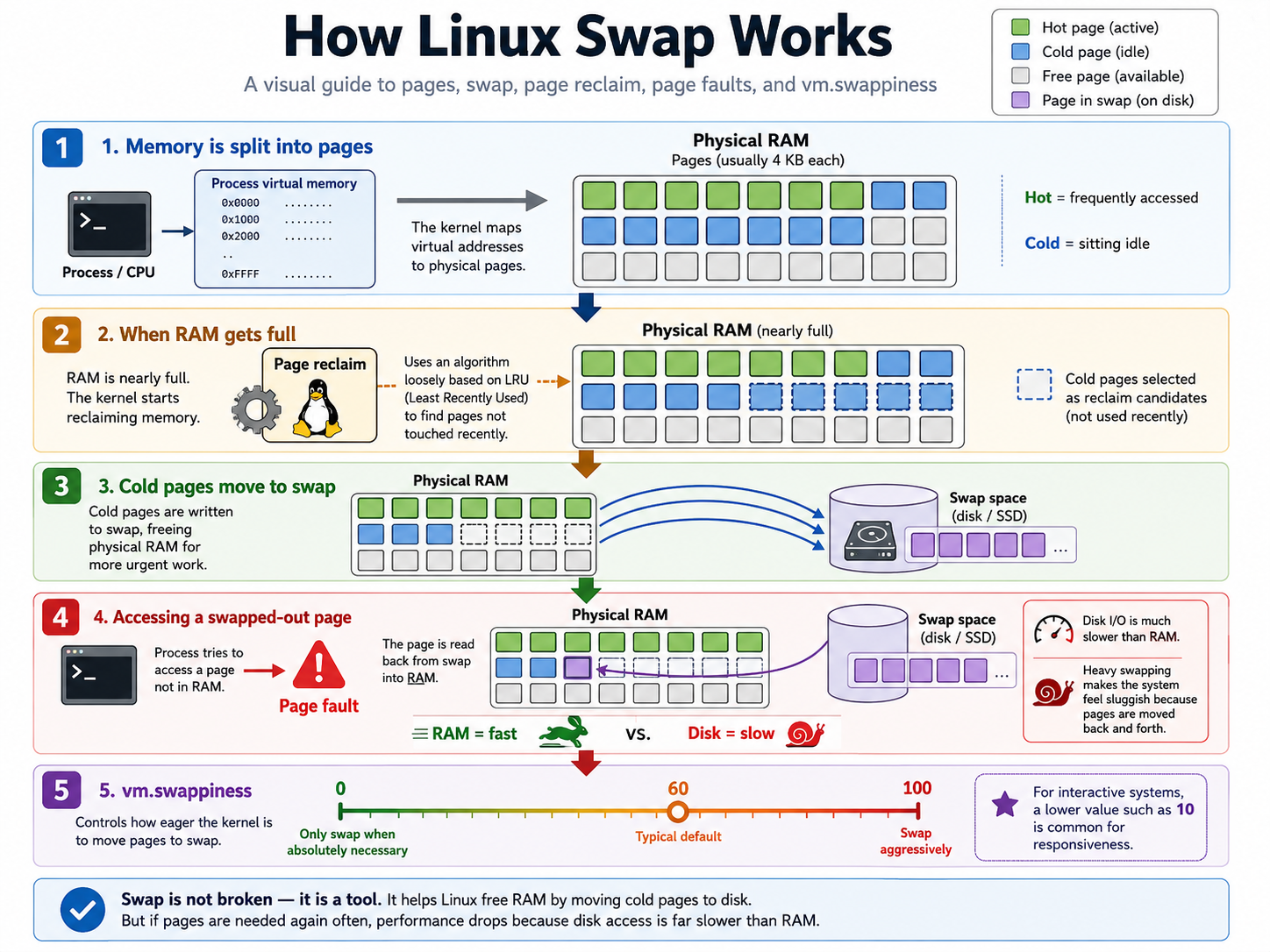
When RAM fills up, the kernel needs somewhere to dump memory pages it isn't actively using. Swap is that place — a chunk of disk (either a dedicated partition or a plain file) that acts as an overflow. Think of RAM as your desk and swap as a filing cabinet across the room. Slower to reach, but at least you're not throwing papers on the floor.
Without swap configured, "throwing papers on the floor" is more or less what happens — except the kernel is the one doing it, and your process is the paper.
Two forms:
- Swap partition — a dedicated partition formatted as swap. Marginally faster, but you have to carve out space at partitioning time.
- Swap file — just a regular file the kernel treats as swap. On a VPS where you don't own the partition layout, this is the only real option anyway.
How the Kernel Handles This Under the Hood
Memory in Linux is managed in fixed-size pages (4KB on x86). The kernel tracks which pages are hot (recently accessed) and which are cold (just sitting there). When RAM gets full, page reclaim kicks in — it finds cold pages and writes them out to swap, freeing up physical frames for whatever actually needs them.
The catch: if a process later touches a swapped-out page, a page fault fires and the kernel has to read it back from disk. Disk is orders of magnitude slower than RAM. This is why a machine that's heavily swapping feels like it's running through mud — it's not broken, just constantly reading and writing pages back and forth.
There's a tunable called vm.swappiness (default: 60) that controls how eagerly the kernel pushes pages to swap. Lower values mean it waits longer before swapping. On interactive systems, something like 10 is often more sensible.
The Commands That Fixed It
1. Allocate the file
sudo fallocate -l 4G /swapfile
fallocate reserves disk blocks without writing data, so it's fast. The old-school alternative, dd if=/dev/zero of=/swapfile bs=1M count=4096, writes zeros to every block — slower, but more compatible with older filesystems. On modern ext4 or XFS, fallocate is fine.
2. Lock down permissions
sudo chmod 600 /swapfile
Swap can hold whatever was in RAM — passwords, session tokens, whatever. Root-only access keeps other users from reading it directly off disk.
3. Format it
sudo mkswap /swapfile
Writes a swap header so the kernel recognizes it as valid swap space. At this point it's formatted but inactive.
4. Enable it
sudo swapon /swapfile
Actually turns it on. The kernel can now use it.
5. Verify
free -h
               total        used        free      shared  buff/cache   available
Mem:           985Mi       750Mi        50Mi        10Mi       184Mi       224Mi
Swap:          4.0Gi         0Bi       4.0Gi
That 4.0Gi row is what you want to see.
Temporary vs. Permanent
Here's something I missed at first: swapon doesn't persist across reboots. The file stays on disk just fine, but Linux won't use it as swap again until you tell it to. So after a reboot:
Before reboot:
  /swapfile exists       ✓
  swap is active         ✓

After reboot:
  /swapfile still exists ✓
  swap is inactive       ✗  (unless added to /etc/fstab)
Check what's currently active with:
swapon --show
To make it permanent:
echo '/swapfile none swap sw 0 0' | sudo tee -a /etc/fstab
The -a appends rather than overwrites — don't skip that flag.
Cleaning It Up
If you ever want to tear it all down:
sudo swapoff /swapfile
sudo rm /swapfile
And remove the fstab line too, otherwise the kernel will complain on next boot about a swap file that no longer exists.
Did It Work?
Yes. Slower than I'd like, but the install finished. The kernel did exactly what swap is designed for — bought enough breathing room to get through a memory spike without killing the process.
On a 1GB machine, swap isn't optional. It's the thing standing between you and the OOM killer arbitrarily murdering whatever it feels like. That said — it's not a real substitute for RAM. If your system is living in swap day-to-day, the fix is more memory or fewer processes, not a bigger swap file.