Docker Cheat Sheet
Docker Basics
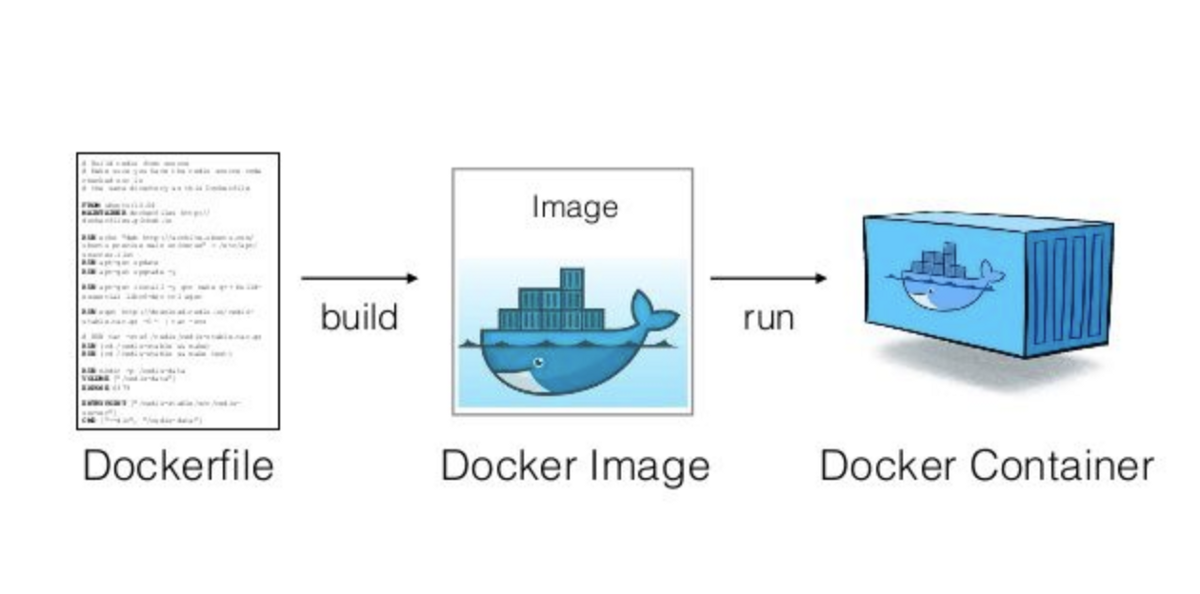 source: cto.ai
Docker is a platform for developers and sysadmins to develop, deploy, and run applications with containers.
- Container: A container is a standard unit of software that packages up code and all its dependencies so the application runs quickly and reliably from one computing environment to another.
- Image: An image is a read-only template with instructions for creating a Docker container.
- Dockerfile: A Dockerfile is a text document that contains all the commands a user could call on the command line to assemble an image.
General Commands
docker --version- Show the Docker version informationdocker info- Display system-wide informationdocker --help- Show helpdocker system df- Show Docker disk usage
Images
Build
docker build -t <image_name> .- Build an image from a Dockerfile-tflag is used to tag the image with a name.is the path to the Dockerfile
docker build -t <image_name> -f <Dockerfile_name> .- Build an image from a specific Dockerfiledocker build -t <image_name> --no-cache .--no-cacheflag can be used to build the image without cache, for more info check FreeCodeCamp's tutorial here.
docker buildx prune- Remove build cache
Manage
docker images- List all imagesdocker image rm <image_id>- Remove an image- Alias:
docker rmi <image_id>
- Alias:
docker image prune- Remove all dangling images- Dangling images are images that have no tag and are not used by any container
docker image prune -a- Remove all images that are not used by any containerdocker pull <image_name>- Pull an image from the registry- e.g.: Getting IoTDB official image
docker pull apache/iotdb:1.0.1-standalone
- e.g.: Getting IoTDB official image
Containers
Create and Run
docker run --name <container_name> <image_name>- Create and run a containerdocker run -p <host_port>:<container_port> <image_name>- Map a host port to a container portdocker run -d <image_name>- Run a container in detached mode (background)
<image_name>should always be the last argument in the command.
Start and Stop
docker start <container_id>- Start a containerdocker stop <container_id>- Stop a container
Manage
docker ps- List all running containersdocker ps -a- List all containers (running and stopped)docker rm <container_id>- Remove a containerdocker container prune- Remove all stopped containersdocker container stats- Display a live stream of container(s) resource usage statisticsdocker logs <container_id>- Fetch the logs of a containerdocker exec -it <container_id> CONTAINER COMMANDS- Execute a command in a running container-itflags are used to open an interactive terminalbashis the command to execute- e.g.:
docker exec -it <container_id> bash